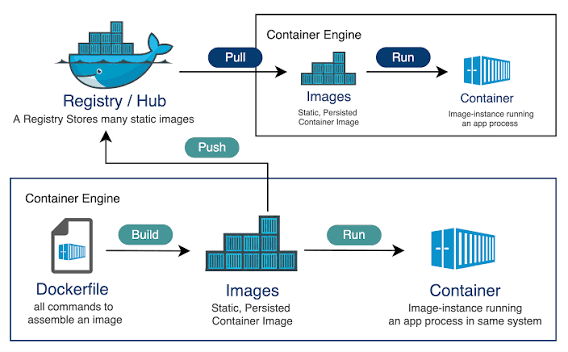
Docker containers revolutionized how developers build, test, and ship software. While containers feel like lightweight virtual machines, they operate differently under the hood. A VM runs a full guest operating system on top of a hypervisor. A Docker container is simply an isolated Linux process running directly on the host kernel. Let's explore the three kernel tools that make this possible.
1. Linux Namespaces: Process Isolation
Namespaces isolate process views of system resources. When a container runs, Docker assigns it specific namespaces:
PID Namespace: Isolates process IDs. The container's main entry process thinks it is PID 1, but on the host, it runs as a standard PID.
NET Namespace: Isolates network interfaces, routing tables, and ports.
MNT Namespace: Isolates filesystem mount points.
UTS Namespace: Isolates hostnames and domain names.
2. Control Groups (cgroups): Resource Constraints
Without limits, a single compromised container could consume all host RAM and CPU cores, bringing down the system. **Control Groups** (cgroups) manage resource allocation. Docker uses cgroups to hard-limit memory access, configure CPU shares, and rate-limit disk I/O for each container, ensuring multi-tenant stability.
3. UnionFS (Union File System) and Layer Stacking
Containers construct filesystems by stacking read-only layers using UnionFS (typically Overlay2). When you build an image, each instruction in the Dockerfile creates a new layer. To save space, layers are shared across containers. When a container writes a file, Docker uses **Copy-on-Write** (CoW), copying the file to the container's thin, writable top layer, keeping the underlying image layers completely untouched.